

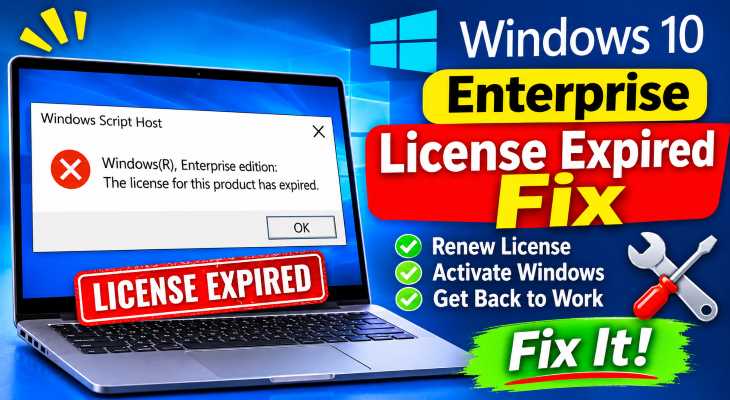
If you want to windows 10 enterprise license expired fix, encountering constant pop-up notifications stating “Your Windows license will expire soon” or activation error codes can severely interrupt your work environment. If you have been searching for an effective method to windows 10 enterprise license expired fix, you are in the right place. This frustrating enterprise activation issue typically occurs due to KMS (Key Management Service) host server connection timeouts, expired volume license product keys, corrupted Software Protection service files, or desynchronized system date and time settings.
In this comprehensive guide, we will walk you through the top troubleshooting steps to renew your enterprise volume activation and restore clean system functionality on Windows 10 Enterprise.
Table of Contents
What Causes Windows 10 Enterprise License Expired Errors?
Before applying the fixes, understanding why this happens helps:
KMS Host Activation Timeouts: The PC failing to connect to the organization’s internal Key Management Service server every 180 days.
Corrupted Software Protection Service: The background Windows activation licensing service (
sppsvc) hanging or stopping unexpectedly.Expired MAK or GVLK Keys: The installed Volume License key reaching its maximum device limit or expiring within the domain network.
Top Methods to Apply Windows 10 Enterprise License Expired Fix
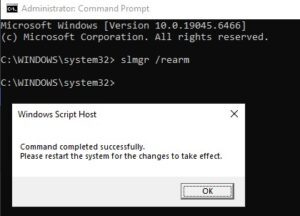
Method 1: Re-arm the Windows Licensing Status via Command Prompt
Resetting the volume licensing state clears temporary activation countdown loops and forces a clean license check:
Press
Win + S, typecmd, right-click Command Prompt, and select Run as administrator.Type
slmgr /rearmand press Enter.Wait for the confirmation dialog box stating “Command completed successfully.”
Restart your computer.
Verification: Open Windows Settings (
Win + I> Update & Security > Activation) to verify that the expiration countdown timer resets.
Method 2: Force Online Activation Against KMS Host Server
Forcing an immediate re-activation ping to your organization’s KMS server manually updates the volume license token:
Open Command Prompt as administrator.
Type
slmgr /atoand press Enter to trigger online activation.If your network uses a specific KMS host IP or address, type
slmgr /skms your-kms-server-address:1688first, then runslmgr /ato.Verification: A pop-up notification will appear confirming “Activating Windows(R), Enterprise edition… Product activated successfully.”
Method 3: Restart the Software Protection Service
Refreshing the core licensing background daemon clears file lock errors and restores auto-renewal tasks:
Press
Win + R, typeservices.msc, and press Enter.Scroll down to locate Software Protection service.
Right-click Software Protection and select Restart (if grayed out or stopped, click Start).
Verification: Re-open the Activation Settings page to confirm Windows detects valid volume licensing parameters.
- If you’re also experiencing other windows 10 Fix Windows 10 Enterprise Remote Desktop Error
Frequently Asked Questions (FAQs)
Q: Why does Windows 10 Enterprise say my license is expiring if activated by my organization?
A: Enterprise KMS activations require clients to connect to the organization’s local network or VPN at least once every 180 days to renew the activation ticket.
Q: Can I convert Windows 10 Enterprise to Windows 10 Pro without reinstalling?
A: Yes, you can change your product key in Settings (Win + I > Update & Security > Activation > Change product key) to a valid Windows 10 Pro retail key to downgrade without losing personal data.
Conclusion
Keeping your enterprise operating system licensing active ensures an uninterrupted, secure computing experience. By mastering these techniques to windows 10 enterprise license expired fix, you can eliminate annoying activation prompts and maintain seamless system stability.
Important Note:
Always ensure your device is connected to your corporate network or corporate VPN when renewing enterprise KMS licenses.
Final Thoughts on Enterprise Licensing and Activation Stability
To wrap it up, maintaining a fully synchronized volume activation pipeline and active software protection services is crucial for operating system health and enterprise compliance. By proactively managing KMS host connections and re-arming licensing tokens when necessary, you protect your setup against unexpected feature limitations and maintain peak digital efficiency. Always keep regular backups of your important configuration files before executing deep system modifications. Staying proactive with modern diagnostic tools guarantees long-term digital stability and peace of mind. Windows 10 Enterprise License Expired Fix