Activate Windows 10 Is your Windows 10 PC showing the annoying “Activate Windows” watermark in the bottom-right corner of your screen? While Windows 10 works perfectly fine without activation, activating your operating system unlocks essential personalization features and ensures you receive crucial security updates.
In this step-by-step guide, we will show you how to officially activate Windows 10 using a genuine product key.
“If you are also facing update errors, check our guide on how to fix [Virus and Threat Protection] warnings.”
How to Activate Windows 10 Using a Product Key
If you already have a 25-digit genuine license key, follow these simple steps to activate your system instantly:
Step 1: Open Windows Settings
Press the Windows Key + I shortcut on your keyboard to instantly open the Windows Settings menu.
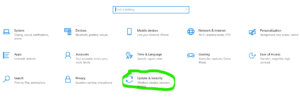
Step 2: Navigate to Update & Security
From the main settings dashboard, look for the Update & Security option and click on it.
Step 3: Access the Activation Tab
In the left sidebar menu, click on Activation. Here, you will see your current Windows edition and activation status.


Step 4: Enter Your 25-Digit Product Key
Click on the Change product key link. A blue dialog box will pop up. Carefully type your 25-digit product key (looks like this: XXXXX-XXXXX-XXXXX-XXXXX-XXXXX) and click Next. Windows will verify the key with Microsoft servers and activate your PC within seconds.
Where Can You Get a Genuine Windows 10 Product Key?
Activate Windows 10 If you don’t have a license key yet, you can obtain one through these official methods:
“If you are also facing update errors, check our guide on how to fix [Virus and Threat Protection] warnings.”
-
Microsoft Store: You can purchase a retail license directly from the official Microsoft website. It is tied to your Microsoft account and can be transferred to a new PC in the future.
-
Authorized Retailers: Major trusted retailers like Amazon or Best Buy sell genuine physical or digital Windows 10/11 product keys.
-
New PC Purchase (OEM): If you bought a pre-built desktop or a laptop from brands like Dell, HP, or Lenovo, your device already includes a built-in OEM digital license.
Frequently Asked Questions (FAQ)
Q1: Where can I find my Windows 10 product key? Ans: If you bought a physical copy of Windows, the product key is usually on a label or card inside the box. If you purchased it online, you will find it in your confirmation email. For pre-installed Windows, the key is linked to your PC’s motherboard or located on a sticker under the laptop.
Q2: Can I use a Windows 7 or 8 product key to activate Windows 10? Ans: Microsoft officially closed the free upgrade path using older Windows 7 or 8 keys. To activate Windows 10 successfully now, you generally need a genuine Windows 10 or Windows 11 product key.
Q3: What is the difference between a Product Key and a Digital License? Ans: A Product Key is a 25-character code used to activate Windows manually. A Digital License is linked directly to your Microsoft account or hardware configuration, meaning Windows will automatically activate without entering a key if you reinstall it.
Q4: How many times can I use the same Windows 10 product key? Ans: It depends on the license type. A Retail key can be moved and used on another PC, but only on one machine at a time. An OEM key is permanently tied to the first computer it activates and cannot be transferred to a new PC.
Q5: Why am I getting an activation error after entering my product key? Ans: This usually happens due to a typo, using a key for a different edition (e.g., using a Home key on Windows 10 Pro), or server issues. Double-check the characters, ensure your Windows edition matches the key, and check your internet connection.
Conclusion
Activating Windows 10 legally keeps your computer safe from malware and gives you a fully customized desktop experience. Avoid using illegal third-party activation software, as it poses high security risks to your personal data.
Note: Always ensure you are purchasing Windows product keys from authorized Microsoft partners or the official Microsoft Store. Avoid buying extremely cheap keys from unverified websites, as they are often blocked later and can leave your system vulnerable to security risks.