Encountering system component store errors can be frustrating, especially when system file checkers fail. If you have been searching for an effective method to fix windows 11 cbs log file corruption, you are in the right place. The Component-Based Servicing (CBS) log records events related to software installations, updates, and uninstalls. When this log or its underlying structure becomes corrupted, running essential system repairs like SFC or DISM can throw unexpected errors.
In this comprehensive guide, we will walk you through the top troubleshooting steps to resolve CBS log file corruption on your Windows 11 computer.
Table of Contents
What Causes CBS Log File Corruption?
Before applying the fixes, understanding why this happens helps:
Interrupted Windows Updates: Force shutdowns during critical patch installations.
Failing Storage Drives: Bad sectors or dying SSD/HDD storage components.
Third-Party Software Conflicts: Aggressive antivirus programs blocking system writes.
Top Methods to Fix Windows 11 CBS Log File Corruption
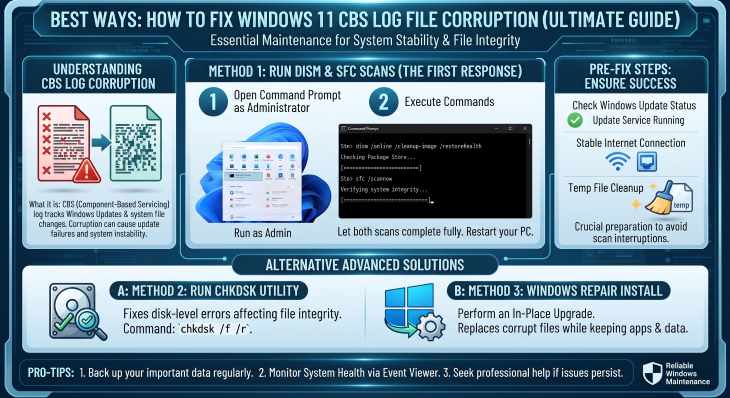
Method 1: Run the SFC and DISM Scans
The primary tool to repair corrupted system files is the System File Checker, paired with the Deployment Image Servicing and Management tool:
Open Command Prompt as administrator (press
Win + S, typecmd, and select Run as administrator).Type
DISM.exe /Online /Cleanup-image /Restorehealthand press Enter.Once completed, type
sfc /scannowand hit Enter.Restart your computer to apply the fixes.

Method 2: Clear or Rename the CBS.log File
If the log file itself has grown too large or corrupted to read:
Stop the Windows Modules Installer service via services.msc or command prompt.
Navigate to
C:\Windows\Logs\CBS.Rename or clear the
CBS.logfile to force Windows to generate a fresh, uncorrupted log file.
Method 3: Perform a Windows 11 In-Place Upgrade
If core servicing components remain damaged beyond basic repair:
Download the official Windows 11 ISO from the Microsoft Support website.
Mount the ISO and run
setup.exefrom within your running operating system.Choose the option to keep your personal files and apps, then proceed with the installation.
If you’re also experiencing other Windows 10 or 11 Activation Problems Best Ways: How to Check SSD Health Windows 10 11
Frequently Asked Questions (FAQs)
Q: Is it safe to delete the CBS.log file?
A: Yes, Windows automatically creates a new CBS.log file as soon as servicing operations or system scans require it.
Q: Why do I get errors when running SFC /scannow?
A: This usually happens when the underlying component store (managed by DISM) is also damaged. Running DISM restorehealth first usually resolves this.
Conclusion
Keeping your component store clean ensures long-term operating system stability. By mastering these techniques to fix windows 11 cbs log file corruption, you can protect your personal files and avoid catastrophic system reinstalls.
Important Note:
Regular maintenance checks and timely hardware monitoring keep your storage solid-state drives healthy and prevent unexpected operating system downtimes during critical disk repair procedures.
Conclusion Summary on Storage Monitoring
To wrap it up, maintaining a healthy solid-state drive and clean system logs is crucial for seamless daily operations. By proactively using built-in command tools or dedicated utilities, you protect your valuable data against unexpected system failures and maintain maximum operating speed.
Final Thoughts on Windows Component Health
Taking proactive steps to address servicing errors ensures that your operating system remains resilient against unexpected updates or corruptions. Consistent system checkups protect your files and save you valuable time. Always keep regular backups of your important data before executing deep system repairs or registry modifications. Staying proactive with modern diagnostic tools guarantees long-term digital efficiency and peace of mind.