If your browser reverts automatically, knowing the proper windows 11 default browser keeps resetting fix is essential. Finding your preferred web browser automatically reverting to Microsoft Edge after every system restart or update can be extremely frustrating. If you have been searching for an effective method to fix windows 11 default browser keeps resetting issues, you are in the right place. This annoying behavior typically occurs due to Windows aggressive promotional updates, corrupted file associations, or third-party application conflicts overriding your choice.
If your browser reverts automatically, learning how to fix windows 11 default browser keeps resetting issues is essential. In this comprehensive guide, we will walk you through the top troubleshooting steps to stop your default browser from resetting on your Windows 11 computer and lock your favorite browser permanently.
Table of Contents
Top Methods to Fix Windows 11 Default Browser Keeps Resetting
Before applying the fixes, understanding why this happens helps:
Aggressive OS Updates: Major Windows 11 updates that restore Microsoft Edge as the default protocol handler.
Corrupted Registry Keys: Damaged file extension associations (like
.html,.htm,HTTP, andHTTPS) preventing third-party settings from saving.Conflicting Background Apps: Newly installed software or malicious extensions hijacking system protocols.
## How to Apply Windows 11 Default Browser Keeps Resetting Solutions
Method 1: Set Default Apps Manually by File Type
Instead of just clicking “Set Default” with a single click, changing every relevant protocol individually prevents Windows from overriding your choice:
Open Windows Settings (press
Win + I).Navigate to Apps > Default apps.
Search for your preferred browser (e.g., Google Chrome or Firefox) and click on it.
Go through critical file types and protocols one by one (such as
.htm,.html,HTTP, andHTTPS) and manually assign them to your preferred browser. windows 11 default browser keeps resetting
Method 2: Create a New Local User Account
If your current user profile data or registry permissions are heavily corrupted:
Open Settings > Accounts > Other users.
Click Add account and create a new local administrator profile.
Log into the new account and set your default browser to verify if the resetting behavior stops.
If you’re also experiencing other Windows 10 or 11Best Ways: Windows 11 Subsystem for Linux Error Fix (Ultimate Guide)
Method 3: Run System Maintenance and DISM Scans
Corrupted system images can sometimes revert registry modifications automatically: windows 11 default browser keeps resetting
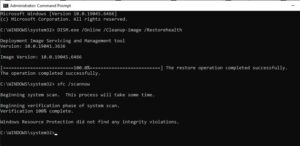
Open Command Prompt as administrator (press
Win + S, typecmd, and select Run as administrator).Type
DISM.exe /Online /Cleanup-image /Restorehealthand press Enter.Once completed, run
sfc /scannowto repair underlying system file structures, then reconfigure your default browser.
Frequently Asked Questions (FAQs)
Q: Why does Windows 11 keep forcing Microsoft Edge?
A: Windows 11 is designed to tightly integrate Microsoft services, often treating major feature updates as opportunities to reset web protocol handlers back to the native Edge browser.
Q: Can I permanently lock my default browser?
A: Yes, by manually mapping every individual protocol extension (HTTP, HTTPS, HTM) rather than using the single-click default button, Windows is far less likely to revert your settings.
Conclusion
Keeping your preferred web environment stable ensures an uninterrupted browsing and workflow experience. By mastering these techniques to fix windows 11 default browser keeps resetting, you can maintain total control over your system applications.
Important Note:
Always maintain regular system backups and keep your operating system updated to avoid unexpected file association bugs during major cumulative updates. windows 11 default browser keeps resetting.
Final Thoughts on System Customization and Control
To wrap it up, maintaining a fully controlled and customized operating system environment is crucial for seamless daily operations. By proactively using built-in protocol settings and keeping your app associations clean, you protect your valuable preferences against unexpected resets and maintain maximum digital efficiency. windows 11 default browser keeps resetting. Always keep regular backups of your important data before executing deep registry modifications or system updates. Staying proactive with modern diagnostic tools guarantees long-term digital efficiency and peace of mind.