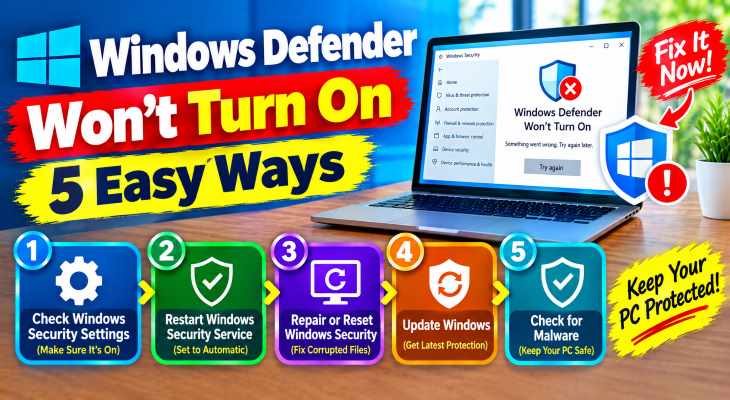
Finding your computer’s core security shield disabled can be alarming. When Windows Security refuses to activate, or the toggle switch keeps turning back off, your system is left vulnerable to malware and online threats. Knowing fix windows defender wont turn on issues is critical for maintaining an airtight defense on your PC.
In this comprehensive guide, we will walk you through the top methods to resolve Windows Defender startup errors and restart your antivirus services on Windows 10 and 11.fix windows defender wont turn on.
Table of Contents
What Causes Windows Defender Not to Turn On?
Before applying fixes, understanding the root causes helps:
Conflicting Third-Party Antivirus: Remnants of old antivirus software can block Windows Defender.
Corrupted System Files: Damaged Windows system registry or core security services.
Group Policy Restrictions: Tweaks or malware disabling security policies.
Top Ways to Fix Windows Defender Won’t Turn On
Method 1: Enable Windows Defender via Services
Sometimes the core security services are simply disabled or set to manual:
Press
Win + R, typeservices.msc, and press Enter.Scroll down and locate Security Center and Windows Defender Antivirus Service.
Right-click each service, select Properties, change the Startup type to Automatic, and click Start.

Method 2: Check for Conflicting Third-Party Antivirus
Leftover files from McAfee, Norton, or Avast frequently block native security suites:
Open Control Panel and go to Programs and Features.
Check if any old or expired third-party antivirus software is still installed.
Uninstall it completely and use the vendor’s dedicated removal tool if necessary, then restart your PC. fix windows defender wont turn on.
Method 3: Run SFC and DISM Scans
Corrupted system files often prevent security center components from launching:
Open Command Prompt as administrator (press
Win + S, typecmd, and select Run as administrator).Type
sfc /scannowand press Enter.Once completed, type
DISM /Online /Cleanup-Image /RestoreHealthand press Enter, then reboot.
Method 4: Enable Windows Defender via Registry Editor
If the UI toggle is greyed out, registry tweaks can force-enable it:
Press
Win + R, typeregedit, and press Enter.Navigate to:
HKEY_LOCAL_MACHINE\SOFTWARE\Policies\Microsoft\Windows DefenderLook for a DWORD named
DisableAntiSpyware, double-click it, and set its value data to0.- If you’re also experiencing other Windows 10 or 11 Activation Problems, check our guide How to update bios safely windows pc.
Frequently Asked Questions (FAQs)
Q: Can a malware infection stop Windows Defender from opening?
A: Yes. Advanced malware and rootkits often target security services specifically to prevent themselves from being detected and deleted by Windows Defender.
Q: Do I need a third-party antivirus if Windows Defender is working?
A: No. Modern Windows Defender offers robust, real-time cloud protection, ransomware defense, and firewall management, making extra antivirus software unnecessary for most users.
Conclusion
Leaving your security shield down puts your personal data at risk, but mastering fix windows defender wont turn on troubleshooting allows you to restore protection instantly. By enabling core services, clearing conflicting software, and repairing system files, your PC stays completely secure. For additional support, visit Microsoft Support. “Ensuring your security tools remain active is vital for overall system health and data protection. Maintaining an active and fully functioning cybersecurity shield is critical for preventing malware injections and safeguarding your personal files against unexpected digital threats.”
NOTE “Sharing practical solutions for common Windows hardware and software roadblocks helps build strong organic authority, ensuring your tech troubleshooting blog delivers continuous value to readers while maximizing long-term AdSense growth.” fix windows defender wont turn on